


Inventory management software KeyWedgeasset managementlabel readingbarcode reading

Add to favorites
Compare this product
Characteristics
- Function
- asset management, traceability, inventory management, label reading, barcode reading
- Applications
- for camera, for 1D/2D barcode
- Type
- 2D, 1D
- Operating system
- Windows, native Windows
Description
Overview
Getac KeyWedge is a Windows-based barcode reader utility that enables one-touch camera-based scanning on Getac rugged tablets and laptops. It injects scanned barcode data directly into target applications via the device's rear camera—no additional hardware or SDK integration required.
Key benefits
Main features
Compatibility & deployment
Use cases
Additional information
Technical specifications
Getac KeyWedge is a Windows-based barcode reader utility that enables one-touch camera-based scanning on Getac rugged tablets and laptops. It injects scanned barcode data directly into target applications via the device's rear camera—no additional hardware or SDK integration required.
Key benefits
- Deploy barcode scanning across existing Getac devices without extra hardware
- Cost-effective alternative to dedicated scanners for low-to-moderate volumes
- Configurable template scan mode to optimise label location and read rates
- Multiple licensing tiers (Pro, Enterprise) to match scale and feature needs
Main features
- Single, multiple (sequential) and continuous scanning modes
- One-touch scan via app icon or programmable hardware button (dual triggers)
- Template scan mode and torch support for low-light conditions
- Supports major 1D and 2D symbologies and common/custom UPC schemes
- Settings Share to copy configuration between devices via scan
- Scan History for review and reuse of scanned items
- Command-line script support for bulk configuration changes
- Multi-language support (up to 12 languages)
Compatibility & deployment
- Windows OS supported on Getac rugged tablets and laptops equipped with a rear camera
- No SDK integration required; scanned data can be injected into target applications
- Delivered as an installable application for rapid field deployment
Use cases
- Asset tracking and inventory management in manufacturing, utilities, transportation and field service
- Public safety and healthcare identification workflows requiring mobile scanning
- Low-to-moderate volume scanning scenarios where dedicated hardware is not justified
Additional information
- Available as a software utility with trial options (trial subject to license terms)
- Licensing tiers (e.g., Pro, Enterprise) provide feature and scale flexibility
Technical specifications
- Platform: Windows OS (Getac-supported devices)
- Devices: Getac tablets and laptops with rear camera
- Scan modes: single, multiple (sequential), continuous
- Trigger: app icon or programmable hardware button (dual triggers)
- Symbologies: major 1D/2D barcodes; common and custom UPC schemes
- Configuration: template scan mode, Settings Share, command-line changes
- Auxiliary: torch support, scan history
- Languages: up to 12 supported
- Licensing: Pro and Enterprise tiers
- No additional hardware or SDK required for basic operation
Catalogs
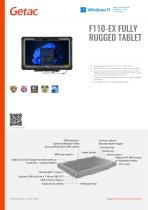
F110-EX FULLY RUGGED TABLET
2 Pages
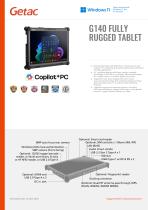
G140 FULLY RUGGED TABLET
2 Pages
Other GETAC products
Essentials Suite


Related Searches
- Automation software solution
- Management software solution
- Windows software solution
- Real-time software solution
- Computer-aided design software
- Online software
- Monitoring software solution
- Measurement software
- Reporting software solution
- Engineering software
- 2D software
- Data acquisition software
- Security software
- Tracking software solution
- Calibration software
- Android software solution
- Traceability software
- Software for automotive applications
- Dashboard software solution
- Software suite
*Prices are pre-tax. They exclude delivery charges and customs duties and do not include additional charges for installation or activation options. Prices are indicative only and may vary by country, with changes to the cost of raw materials and exchange rates.