|
|
COULOMB Features:
- Direct links to major CAD packages for true representation of complex geometric shapes
- Assign constant or non-uniform charge distributions to surfaces
- Simulate non-linear conductivity and permittivity
- Analyze static electric fields, electrical conduction and quasi-statics of lossy dielectrics
- Export data to spreadsheet and other software programs for further analysis
- Display results with graphs, animations, and contour, arrow, streamline or vector loci plots
|
|
ELECTRO Features:
- Choose a Boundary Element Method (BEM), Finite Element Method (FEM) or Hybrid BE-FE Method Solver that combines the strengths of both BEM and FEM analysis
- Direct links to major CAD packages for true representation of complex geometric shapes
- Assign constant or non-uniform charge distributions to surfaces
- Simulate non-linear conductivity and permittivity
- Analyze static electric fields, electrical conduction and quasi-statics of lossy dielectrics
- Export data to spreadsheet and other software programs for further analysis
- Display results with graphs, animations, and contour, arrow, streamline, or vector loci plots
|
|
Navigating the New World of Airframe Development
VISTAGY airframe development environments are specialized engineering software applications developed specifically for the design and manufacture of airframes and large aerostructures. Today's state-of-the-art airframe design calls for digital model-based definitions that minimize the tedious, time-consuming process of creating drawings, while taking into account new composite materials, manufacturing technologies and globally distributed partners. VISTAGY understands these challenges. Our software helps you easily author and capture complete digital representations of airframe assemblies and share critical design and manufacturing detail more efficiently than ever-across your enterprise and the global supply chain.
|
|
|
|
|
|
The award-winning Autodesk® Maya® software is a powerful, integrated 3D modeling, animation, visual effects, and rendering solution. Because Maya is based on an open architecture, all your work can be scripted or programmed using a well-documented and comprehensive API (application programming interface) or one of two embedded scripting languages, the Maya Embedded Language (MEL) or Python®. This level of openness, combined with an industry-leading suite of 3D visual effects, computer graphics, and character animation tools, enables you to realize your creative vision for your film, television, game development, and design projects.
Autodesk Maya Complete Features
Autodesk® Maya® Complete software, a comprehensive suite of tools for 3D modeling, animation, and rendering within a single, production-proven workflow, is the choice of award-winning digital artists and animators.
Intuitive User Interface
Data and Scene Management Tools
Polygon Modeling
NURBS Modeling
Subdivision Surface Modeling and Polygon Proxy Modeling
General Animation
Character Animation
Muscle and Skin System
Deformers
Rigid and Soft Body Dynamics
Particles and Fields
Maya Paint Effects
Toon Shader
Maya Artisan
3D Paint
Multiple Rendering Options
Rendering Controls and Effects
Integrated Scripting
OpenMaya API/SDK
Japanese Localization
Connectivity and Integration
CAD Data Transfer
Plug-ins
|
|
Generate manufacturable class A polygonal models
Transform aligned point clouds into highly accurate polygonal models using PolyWorks' unique tolerance-based adaptive meshing technology.
Reconstruct perfect polygonal features from imperfectly digitized geometry.
Apply all typical CAD operations directly to polygonal models and prepare these models for a wide variety of manufacturing applications such as milling, rapid prototyping, reverse engineering, inspection, CFD & FEA, digital review, etc.
|
|
|
|
|
|
The Acoustics Module is a world-class solution to all your acoustics modeling needs. Easy-to-use application modes provide the tools to model acoustic wave propagation in air, water, other fluids—and even solids.
It is designed specifically for those who work in classical acoustics with devices that produce, measure, and utilize acoustic waves. Just a few application areas from the audio industry include speakers, microphones, and hearing aids, while those for noise control can address muffler design, sound barriers, and building acoustics.
The modeling of acoustics-structure interaction is easily done with the Acoustics Module. This capability is particularly attractive for appli-cations such as the design of sonar transducers in medical and non-destructive testing applications as well as those used for noise and vibration analyses.
This module also features a special interface for modeling aeroacoustics, which is especially useful for the control of aircraft engine noise. In addition, its general multiphysics ability enhances classical acoustics with further accuracy.
|
|
OOFELIE VibroAcoustics, driven by SAMCEF Field, is a Virtual Prototyping tool for the analysis and design of acoustics and vibro-acoustics situations.
Through the use of SAMCEF Field modeling capabilities, it becomes possible to start simulating the performance of such systems even before a single physical prototype is built.
Design changes can be evaluated faster and in a more affordable manner, reducing the number of actual prototypes required to achieve a required design maturity, thus accelerating significantly product development.
Thanks to such a tool, the engineers acquire a capability to isolate and analyze the effect of each parameter. With such insight available at their fingertips, information can be quickly gained to correct or improve previous designs efficiently knowing which are the influent factors.
Reduced design time, improved quality and reduced costs are some of the benefits one can now reap from using OOFELIE VibroAcoustics, driven by SAMCEF Field.
|
|
STAR6 Modal
The STAR6 System™ combines the latest structural analysis technology with an intuitive interface based on Microsoft Windows™. From operating deflection shapes to modal and time domain analysis, from advanced analysis of multireference parameter estimation to structural dynamics modifications, STAR6 does it all.
STAR6 Acoustics
Optimized for identifying noise sources and quantifying sound power, CATSAcoustics / STARAcoustics simplifies testing and helps you attain unmatched testing accuracy.
|
|
|
|
|
|
eZ-Analyst
Real-Time Vibration and Acoustic
Analysis Software for the 600 Series,
WaveBook/516E, and ZonicBook/618E
eZ-Analyst software from IOtech adds real-time continuous and transient data acquisition in the Time, Frequency, or Order domain to 600 Series, ZonicBook/618E, and WaveBook/516E systems. Today’s eZ-Analyst is the compilation of over 10+ years of continuous software development and customer inputs that results in the most versatile vibration analyzer available.
Key Highlights
• Real-time FFT analysis
• Easy-to-use graphical user interface provides
fast setup
• Field expandable from 8 to 56 channels
• Supports four separate tachometer channels
• 3D Color Waterfall Spectrum Display
• Order Normalization and Order Tracked Plots
• Multiple Plot Overlays
• View all functions simultaneously in eight display windows with up to 16 data overlays in each window
• Export your data to Excel, ME Scope, SMS Star, or UFF type 58 ASCII or Binary
• Wide selection of real-time analysis features, including integration/differentiation synchronous averaging, and much more
|
|
|
|
|
|
WITNESS, the world's leading business simulation system, gives you the power and flexibility to model your working environment, simulate the implications of different business decisions and understand any process, however complex. As a result, you can always be confident that you have found the best business solution for your organization-before making a financial commitment to change.
Designed with simplicity in mind, some of the keys to its success are:
Simple and powerful building block design
Modular and hierarchical structure
Easy to use standard Windows PC implementation
Extremely interactive
Powerful range of logic and control options
Elements for discrete manufacture, process industries, BPR, e-commerce, call centers, health, finance and government
Comprehensive statistical input and reports
Quality graphical displays
Great linkage-databases (ORACLE, SQL Server, Access, etc), direct spreadsheet links in/out, XML save formats, HTML reports, links from partner BPM and CAD applications, and more
|
|
|
|
|
|
Getting your CAD geometries ready for FEA modeling is easier than ever with the CAD Import Module. It facilitates the reading of industry-standard formats such as STEP, IGES, ACIS® (SAT®) or Parasolid®. Extra add-ons support file formats for packages that have their own geometry kernel.
The CAD Import Module goes beyond just the reading of file formats. The interactive repair feature assures that imported geometries are mathematically correct for FEA modeling. And, in order to cut down on unnecessary details in your CAD geometries, defeaturing tools that remove fillets, small faces, sliver faces, as well as spikes or short edges are included.
The CAD Import Module also provides bidirectional interfaces to SolidWorks® and Autodesk® Inventor® that maintain associativity with these CAD systems. This means that geometric parameteric sweeps can be run using the COMSOL models, which result in automatically updating of the CAD geometry in the corresponding CAD system. Such parametric studies can also be run using clusters and can be set up directly from the user interface. For a list of supported versions, see the System Requirements page.
|
|
|
|
|
|
Driving Early Design Validation with SimDesigner Solutions for the CAD Environment
MSC SimDesigner provides analysis plug-in solutions for the CAD environment. The SimDesigner product line has now been expanded to meet the unique design requirements of engineering organizations. The SimDesigner Workbench Edition embeds simulation tools directly inside the CAD system, whereas the new SimDesigner Template Edition offers the ability to run SimEnterprise analysis templates which are developed and managed by analysis experts in the enterprise.
SimDesigner Workbench Edition
SimDesigner Workbench Edition provides a suite of CAD embedded plug-ins that offer native multidisciplinary analysis capabilities for linear and nonlinear structures, thermal, and motion simulation. Engineers benefit from native CAD associativity thereby speeding design-analysis iterations.
SimDesigner Template Client Edition – New!
SimDesigner Template Client Edition is new to the SimDesigner product family! This product provides a method for designers and design engineers to retrieve and execute expert-created simulation templates from directly within their familiar CAD environment – thereby increasing the accuracy of analysis performed by designers.
|
|
|
|
|
|
CEA Technology supplies a set of programs for designing, optimizing and verifying pressure vessels, heat exchangers and columns according to the major design codes for pressure vessels also known as the Central Project Manager.
The CPM is a Windows 32-bit program that enables you to calculate pressure vessels, heat exchangers and columns.
Features:
- Determining the optimal wall thickness, which will save material
- Both design- and verification calculations are possible
- Quick results and a printout which is accepted by any Notified Body
- Windows interface, with graphical possibilities, makes it user friendly
- Alternatives can be calculated in an easy way by changing the input values
The experiences of users is used to improve the program, users such as; engineering companies, plant owners, supervising authorities, universities and manufactures
- Preventing mistakes by using databases for materials, pipes, flanges, bolting and gaskets
- 3D graphic display of the total pressure vessel (also nozzle placement on cylinders, heads and cones)
- Input and output can be saved on a project (vessel and component) basis
|
|
|
|
|
|
Unlike other computational fluid dynamics programs, COSMOSFloWorks combines a high level of functionality and accuracy with ease-of-use.
Fully embedded inside of SolidWorks, COSMOSFloWorks is perfect for the engineer who needs flow analysis, but is not necessarily an expert in the field of fluid simulation. A goal-oriented approach allows you to easily gain insight into the performance of your design under real world conditions.
COSMOSFloWorks can be used in a diverse array of applications and has been designed to be extremely flexible. Whether you are developing a valve for medical industry, a HVAC duct, an electronic enclosure cooling system, an automobile component, the wing of an airplane, or an exhaust valve, using COSMOSFloWorks early in the product development cycle can help you build a better product in less time.
COSMOSFloWorks customers are using the software to build better products in the following industries - Valve/Regulator, Medical, Electronics, HVAC, Automotive, Defense, Aerospace, Oil and Gas, Plastic Extrusion and Food Processing.
|
|
Sample and fraction tracking plus system control for LC purification.
PeakTrak software saves time and eliminates errors by tracking samples and identifying peak fractions in chromatographic purifications. The Windows-based software uses color-coded graphics to locate peak and non-peak fractions in separations performed with Isco CombiFlash automated organic purification systems. Special versions provide dedicated system control and data handling for CombiFlash Sq16x, Sg100c, and OptiX 10 systems.
The standard version of PeakTrak provides data handling only with any LC system using an Isco Foxy 200 or Foxy Jr fraction collector and detector with analog output, including ProTeam systems used for protein purifications.
|
|
|
|
|
|
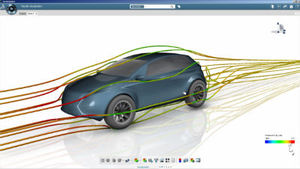
ANSYS CFX software delivers powerful computational fluid dynamics (CFD) technology for simulations of all levels of complexity.
As one of the many computer-aided engineering (CAE) tools available within the ANSYS Workbench platform, ANSYS CFX takes advantage of data and information common to many simulations. This begins with common geometry: Users can link to existing native computer-aided design (CAD) packages as well as create and/or modify CAD models in an intuitive solid modeling environment. Complementing the common geometry model is a suite of meshing tools, designed to ensure easy generation of the most appropriate mesh for the given application. ANSYS CFX tools then guide the user through the setup of operating conditions, selection of materials and definition of models.
The ANSYS CFX solver uses the most modern solution technology with a coupled algebraic multi-grid solver and extremely efficient parallelization to help ensure that solutions are ready for analysis quickly and reliably. Solution analysis with the ANSYS CFX post-processor then gives users the power to extract any desired quantitative data from the solution; it also provides a comprehensive set of flow visualization options. Animations of flow simulations are easily generated, and 3-D images can be directly created and shared with any colleagues or clients using the freely-distributable 3-D viewer from ANSYS CFX.
|
|
|
|
|
|
Basic Information
To meet consumer demands, automotive engineers require development tools which provide accurate representation of complex systems in the virtual world. The ever increasing number of design parameters of traditional and ‘alternative’ powertrain systems means that early concept analysis becomes increasingly important. Powertrain thermodynamic analysis using 3D computational fluid dynamics (CFD) tools is one such discipline.
Through years of development and advancements, AVL’s 3D CFD software FIRETM fulfills these demands. FIRE is used every day by hundreds of powertrain engineers to accurately predict results in a flexible, robust and fast way. FIRE customers make design decisions earlier, and with greater confidence.
AVL FIRETM is the leading simulation program in the field of combustion engine analysis and specialises in accurate prediction of engine gas exchange, mixture formation and combustion, as well as emissions and the exhaust gas aftertreatment.
High Fidelity System Simulation
The overall environment and individual components of FIRE enable application to any phase of the development process. The broad range of available models allows users to properly balance simulation effort and desired precision.
Powertrain Engineering Inside
AVL’s simulation tools are uniquely supported by over six decades of engine development experience. Our own consulting and services business depends on FIRE to deliver results, and provides our software team with invaluable insight into current and future requirements.
|
|
CFdesign software turns your Catia workstation into a fully interactive flow bench, thermal test rig, and wind tunnel. Your 3D assemblies become associative, zero-cost prototypes revealing critical engineering information not available from physical tests. Make a design change in Catia and see the change immediately in CFdesign. Go from Catia to first pass results in minutes; review high fidelity solutions up to 20x faster with the new Accelerant Solver.
|
|
|
CFdesign software turns your UGS NX/I-deas NX workstation into a fully interactive flow bench, thermal test rig, and wind tunnel. Your 3D assemblies become associative, zero-cost prototypes revealing critical engineering information not available from physical tests. Make a design change in UGS NX/I-deas NX and see the change immediately in CFdesign. Go from UGS NX/I-deas NX to first pass results in minutes; review high fidelity solutions up to 20x faster with the new Accelerant Solver.
|
|
CFdesign software turns your Solid Edge workstation into a fully interactive flow bench, thermal test rig, and wind tunnel. Your 3D assemblies become associative, zero-cost prototypes revealing critical engineering information not available from physical tests. Make a design change in Solid Edge and see the change immediately in CFdesign. Go from Solid Edge to first pass results in minutes; review high fidelity solutions up to 20x faster with the new Accelerant Solver.
|
|
CFdesign® software turns your Autodesk Inventor workstation into a fully interactive flow bench, thermal test rig, and wind tunnel.
Your 3D assemblies become associative, zero-cost prototypes revealing critical engineering information not available from physical tests. Make a design change in Autodesk Inventor and see the change immediately in CFdesign.
Go from Autodesk Inventor to first pass results in minutes; review high fidelity solutions up to 20x faster with the new AccelerantTM Solver.
|
|
|
CFdesign software turns your SolidWorks workstation into a fully interactive flow bench, thermal test rig, and wind tunnel. Your 3D assemblies become associative, zero-cost prototypes revealing critical engineering information not available from physical tests. Make a design change in SolidWorks and see the change immediately in CFdesign. Go from SolidWorks to first pass results in minutes; review high fidelity solutions up to 20x faster with the new Accelerant Solver.
|
|
CFdesign software turns your Pro/ENGINEER workstation into a fully interactive flow bench, thermal test rig, and wind tunnel. Your 3D assemblies become associative, zero-cost prototypes revealing critical engineering information not available from physical tests. Make a design change in Pro/ENGINEER and see the change immediately in CFdesign. Go from Pro/ENGINEER to first pass results in minutes; review high fidelity solutions up to 20x faster with the new Accelerant Solver.
|
|
CFdesign software turns your Solid Edge workstation into a fully interactive flow bench, thermal test rig, and wind tunnel. Your 3D assemblies become associative, zero-cost prototypes revealing critical engineering information not available from physical tests. Make a design change in Solid Edge and see the change immediately in CFdesign. Go from Solid Edge to first pass results in minutes; review high fidelity solutions up to 20x faster with the new Accelerant Solver.
|
|
|
|
|
|
Based on the classic work Transport Phenomena by Bird, Stewart, and Lightfoot, the Chemical Engineering Module is the perfect tool for process-related modeling. It is specifically designed to easily couple transport phenomena- computational fluid dynamics (CFD) or mass and energy transport-to chemical reaction kinetics.
We have optimized the module for the modeling of reactors, filtration and separation units, heat exchangers, and other equipment common in the chemical industry. Other modeling interfaces account for electrochemical systems (such as fuel cells) and applications where electric fields influence transport, such as electrophoresis and electrokinetic flow.
The Chemical Engineering Module melds seamlessly with the power of COMSOL Multiphysics for multiphysics and equation-based modeling. This latter feature allows for the inclusion of arbitrary expressions, functions and source terms in the transport equations.
Application Examples
- Batch reactors, fermenters and crystallizers
- Chromatography and electrophoresis
- Corrosion
- Cyclones, separators, scrubbers and leaching units
- Exhaust after-treatment and emission control
- Filtration and sedimentation
- Fuel cells and batteries
- Heat exchangers and mixers
- Homogeneous and heterogeneous two-phase flow - emulsions, suspensions, bubble columns and sparging
- Microfluidics and lab-on-chip devices
- Multicomponent and membrane transport
- Packed bed reactors
- Plug-flow and tubular reactors
- Polymerization processes and non-newtonian fluid dynamics
- Pre-burners and internal combustion engines
- Reformers and catalytic converters
|
|
SolidWorks® Flow Simulation is the first and easiest fluid-flow simulation and thermal analysis program fully embedded within SolidWorks software.
SolidWorks Flow Simulation eliminates the need to modify your design for a different computational fluid dynamics (CFD) application saving considerable time and cost.
With its CFD analysis capabilities, you can simulate liquid and gas flow in real world conditions, run “what if” scenarios, and quickly analyze the effects of fluid flow, heat transfer, and related forces on immersed or surrounding components. Fluids of interest for analysis range from air, water, liquid chemicals, and gases to juice, ice cream, honey, plastic melts, toothpaste, blood, and others.
|
|
|
|
|
|
Thermodynamics and CFD
FIRE and BOOST are the industry's prime choice when reliable results are needed for engine and combustion development. The intelligent integration of the two software tools enables solutions for complex tasks early in the development phase.
Speeding up your processes
The time required to create moving meshes for complex geometries of modern IC engines is reduced to merely days with FIRE's highly specialized and automated pre-processing tool FAME Engine +. Combining fast and efficient mesh generation with FIRE’s state-of-the-art and fully parallelized main program, accurate CFD simulation results have been never available so quickly.
Less experiments, more creativity
Engine performance and durability are strongly impacted by related fluid flow processes, such as the multiphase flow in injection equipment, in-cylinder gas dynamics, fuel injection, combustion, coolant flows, exhaust gas flows and exhaust gas aftertreatment. FIRE’s and BOOST’s industry leading capabilities enable accurate simulation of all related phenomena, reducing the need for costly and time-consuming experiments.
Verified exhaust gas aftertreatment solutions
FIRE and BOOST feature the industry's only seamless integration of 1D, 2D and 3D exhaust gas aftertreatment system simulation tools. It is based on identical mathematical, physical and chemical models, available to both softwares. The model can grow as needed from one to three dimensions with consistent results. Highest accuracy is achieved through implementation of precise chemical reactions and proven by continuous verification on AVL's emission test benches.
|
|
|
COLIBRI™ – a unique modular colour-matching product line that helps users to boost both productivity and efficiency and thus reduce costs - with an unequalled 16 flux algorithm, heritage from more then 30 years experience in colour matching, covers even most complex pigment applications.
|
|
|
|
|
|
FiberSIM®: The World's Leading Software for Composites
Powered by VISTAGY's unique EnCapta® technology, FiberSIM® has become the world's leading software for composites engineering-used by numerous leading manufacturers in the aerospace, automotive, marine and medical equipment industries. The FiberSIM suite of software supports all of the unique and complex design and manufacturing methodologies necessary to engineer innovative, durable and lightweight composite products and parts.
It's also the only comprehensive software suite that addresses the entire composites engineering process, from conception, laminate definition and ply creation through simulation, documentation and manufacturing. FiberSIM is integrated into the leading commercial CAD systems (CATIA V4, CATIA V5, NX and Pro/ENGINEER) to help you capture a truly complete digital product definition. And FiberSIM goes beyond CAD to create a customized environment that enables you to 'work how you think' when designing innovative, bleeding-edge products that create a competitive advantage.
|
|
SAMCEF allows the linear and non-linear analysis of composite materials structures (e.g. sandwich materials [honeycomb, foam...], laminated constructions, filament wound pressure vessels...) including various delamination and progressive damage models of fibers/matrix systems...
SAMCEF Field is the interdisciplinary pre/post-processing tool for SAMCEF for Composites.
|
|
|
|