

- Robotics - Automation - Industrial IT
- Automation
- Terminal with touch screen
- Posiflex Technology


- Company
- Products
- Catalogs
- News & Trends
- Exhibitions
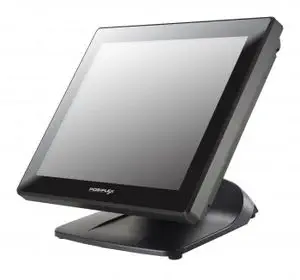
Terminal with touch screen XT-5315table-top1024 x 768Intel® Celeron®

Add to favorites
Compare this product
Characteristics
- Interface
- with touch screen
- Mounting
- table-top
- Resolution
- 1024 x 768
- Processor
- Intel® Celeron®
- Screen type
- LCD
- Operating system
- Windows 10, Linux
- Integrated peripheral
- with card reader
- Protection level
- IP54
- Connectivity
- USB, Ethernet, RJ45, wireless
- Other characteristics
- all-in-one, modular
- Applications
- POS
- Screen size
38 cm
(15 in)
Description
The adjustable bases designed for XT-5315/5515/5515Pro come in two models,<br>Gen 7E/8E, and allow you to determine an ideal position for your terminal by<br>using its unique tilt adjustment mechanism. As the below figures suggest, both<br>bases provide three standard positioning solutions for your terminal: Flat<br>Folded mode, Low Profile mode, and Full Extended mode. <br><br>In general, XT-5315/5515/5515Pro will be set up beforehand in Flat Folded<br>mode and then packaged into the box for shipping. After it is unpacked, you<br>may re-adjust the terminal in either Low Profile mode or Full Extended mode<br>according to your situation. Below will provide instructions on how to adjust<br>the specific base connected to the POS system. As a reminder, please be<br>careful not to touch the LCD panel while setting up the tilt angle.<br>Please refer to the following instructions on how to switch among different<br>positioning modes to find an ideal viewing angle for XT-5315/5515/5515Pro<br>with Gen 7E base.<br>supposed to be set in flat folded mode, out of<br>the package box and then lay your POS<br>system on a flat surface.<br>2. Steady the base with one hand, and then tilt<br>the screen downwards. <br>Position your terminal in Full Extended mode<br>3.1 After grabbing the bottom edge of the screen with your hand, gently<br>move the screen upward until the screen is locked into place with a<br>click sound.<br><br><br>
Catalogs
No catalogs are available for this product.
See all of Posiflex Technology‘s catalogsOther Posiflex Technology products
POS Terminal




Related Searches
- Display module
- LCD display module
- Industrial display module
- TFT LCD display module
- Color display module
- HMI with touch screen
- Control panel display module
- LCD HMI terminal
- RS-232 display module
- Graphic display module
- Digital signage display module
- RFID reader-writer
- USB HMI terminal
- 7" display module
- Barcode scanner
- Ethernet HMI terminal
- Dot-matrix display module
- TFT LCD HMI terminal
- Monochrome display module
- 10" display
*Prices are pre-tax. They exclude delivery charges and customs duties and do not include additional charges for installation or activation options. Prices are indicative only and may vary by country, with changes to the cost of raw materials and exchange rates.
About DirectIndustry
DirectIndustry is a marketplace that offers B2B players a complete experience, from product sourcing to purchase. DirectIndustry is an entity of VirtualExpo Group.
Are you a buyer?
Are you a supplier?
© 2026 All rights reserved - Terms - Privacy policy - General Terms - Manage cookies - 鄂ICP备2026053537号-2 -