



- Company
- Products
- Catalogs
- News & Trends
- Exhibitions
Handheld partial discharge monitor HZJF-90V1

Add to favorites
Compare this product
Characteristics
- Options
- handheld
Description
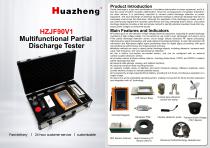
This instrument utilizes high-frequency detection technology to measure partial discharge and integrates several advanced technologies, including computer technology, ultrasonic and radio frequency sensing, transient waveform sampling, analog electronics, high-speed signal acquisition, and digital signal processing. Developed on the Linux operating system platform, it provides both 2D and 3D maps of partial discharge, amplitude-phase spectrum waveforms, and discharge signal quantification values.By observing and analyzing the partial discharge pulse waveform—either statically or dynamically—over a single or multiple cycles, this instrument can thoroughly evaluate the partial discharge condition of electrical equipment. It is particularly suited for the routine inspection of the insulation performance of high-voltage cables, power transformers, and other electrical equipment.With its high sensitivity and strong adaptability, this instrument can effectively detect insulation defects and is an ideal tool for assessing the condition of power equipment during live operation.
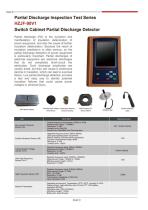
(1) MODE key, used to switch measurement modes.
(2) Power button, press the button to turn on the instrument when it is in shutdown state; in the power-on state, press and hold the power button for two seconds to turn off the instrument.
(3) Four directional keys, used for option switching, setting value modification, and chart type switching.
(4) ESC key, to exit or close a certain page. In the waveform interface, press and hold the key for two seconds to screenshot and save the current waveform.
(5) OK key, used as a confirmation key, to enter a certain page or set a certain parameter.

Other Huazheng Electric products
Transformer Test Equipment


Related Searches
- Monitoring analyser
- Huazheng automatic analyzer
- Calibration system
- Huazheng portable tester
- Huazheng portable analyzer
- Huazheng digital tester
- Huazheng automatic tester
- Real-time analyser
- Huazheng industrial tester
- Generator
- Huazheng automatic testing device
- Huazheng digital analyzer
- Huazheng voltage tester
- Huazheng benchtop tester
- Huazheng waterproof analyzer
- Manual test kit
- Power quality analyser
- Precision calibration system
- Huazheng laboratory tester
- Huazheng tester with LCD screen
*Prices are pre-tax. They exclude delivery charges and customs duties and do not include additional charges for installation or activation options. Prices are indicative only and may vary by country, with changes to the cost of raw materials and exchange rates.
About DirectIndustry
DirectIndustry is a marketplace that offers B2B players a complete experience, from product sourcing to purchase. DirectIndustry is an entity of VirtualExpo Group.
Are you a buyer?
Are you a supplier?