

- Robotics - Automation - Industrial IT
- Industrial Computing
- 15-key keypad
- Clickin Industrial Co., Ltd.

- Company
- Products
- Catalogs
- News & Trends
- Exhibitions
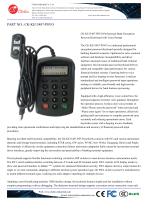
15-key keypad CK-KE13487-PSVObenchtoppolymerUSB

Add to favorites
Compare this product
Characteristics
- Number of keys
- 15-key
- Mounting
- benchtop
- Material
- polymer
- Connection type
- USB
- Other characteristics
- with numeric keypad
Description
Encryption keyboard and rugged plastic numeric keypad with beeping invoice while press the keys,The bank password keypad solves a series of software and hardware incompatibility problems caused by the bank's complicated terminal and inconsistent driver interface programs. It can be connected to PC and STAR series terminals, GW series terminals, WYSE terminals, New World terminals, Guoguang terminals, Haiwei terminals, purple pin terminals and other major domestic and foreign terminal manufacturers.
Dimensions:
134.0 × 87.0 × 66.0mm.
Application:
Mainly used in banks.
Functions:
Keyboard with voice control box, voice prompt, interface is USB.
Online installation instruction:
1. Dial the main keyboard of the host or terminal and insert it into the J1 port.
2. J2 port is inserted into the original host or terminal keyboard port.
3. Put the encryption keyboard controller on the upper right corner of the big keyboard.
4. Press the button to open the encryption keyboard. The voice prompt ”Hello! Please enter the password”, press the controller button to open the encryption keyboard, and the voice prompt “Please enter again”.
5. After the user enters the password and presses “OK” or no presses within 30 seconds, the password keyboard will automatically send the “confirm” button and close the encryption keyboard.
Catalogs
CE certificate
4 Pages
RoHS certificate
3 Pages
Other Clickin Industrial Co., Ltd. products
INDUSTRIAL


Related Searches
- USB keyboard
- Keyboard for industrial applications
- Panel-mount keyboard
- Keyboard with mechanical keys
- IP65 keyboard
- Washdown keyboard
- PS2 keyboard
- Compact keyboard
- Reinforced keyboard
- Polymer keyboard
- Keyboard with touchpad
- Backlit keyboard
- Desktop keyboard
- QWERTY keyboard
- Custom keyboard
- Panel-mount keypad
- Brushed stainless steel keyboard
- Vandal-proof keyboard
- Keyboard with Fn key
- Metal keyboard
*Prices are pre-tax. They exclude delivery charges and customs duties and do not include additional charges for installation or activation options. Prices are indicative only and may vary by country, with changes to the cost of raw materials and exchange rates.
About DirectIndustry
DirectIndustry is a marketplace that offers B2B players a complete experience, from product sourcing to purchase. DirectIndustry is an entity of VirtualExpo Group.
Are you a buyer?
Are you a supplier?